The problem
A control loop has a budget. A game at 60 frames per second has 16 milliseconds. An interface that responds to what the user is doing has maybe 200 before the response stops feeling connected to the action. An LLM that thinks for four seconds and writes a paragraph cannot participate in either.
What those loops need is a small decision, repeatedly, on the current situation. Which of these four moves, and is it safe to make right now. TypeSafe’s use-case map puts it as decisions made faster than human perception, fast enough to play games or to sit inside a UI, and quotes 150ms for that. TypeSafe’s launch post gives a range of 70ms to 500ms end to end. Both figures are the vendor’s own measurements, and neither appears on the models page alongside the published price and rate limits, so budget against your own numbers from your own region.
The awkward part is that Jev takes text only: a string, a JSON object, or an array of text. There is no vision input. Your code has to turn the frame, the scene or the screen into a description before asking anything, and the quality of that description sets the ceiling on everything after it. typesafe-mario and jev-drone both work this way, serialising a live situation into text and reading back a typed action.
What the state looks like
Your serialiser runs every tick. Send the entities that matter to the decision, already resolved into positions and relations code computed, and nothing else.
{
  "player": { "x": 412, "y": 96, "on_ground": true, "facing": "right" },
  "ahead": [
    { "kind": "gap", "distance_px": 64, "width_px": 96 },
    { "kind": "goomba", "distance_px": 210, "moving": "toward" }
  ],
  "overhead": "clear",
  "recent_action": "run_right"
}
Note what is already numeric. The distances were computed in code, not estimated by the model. Jev judges what the situation means, and everything measurable arrives pre-measured.
The questions you ask
One request per tick, carrying every question the loop might need.
import { choice, noul, TypeSafeClient } from "@typesafe-ai/sdk";

const client = new TypeSafeClient();

const response = await client.systemOne({
  state: frame,
  questions: {
    action: choice("What should the player do right now?", {
      run_right: "Keep moving right along the ground",
      jump_right: "Jump forward to clear something ahead",
      stop: "Stop and wait for the hazard to pass",
      back_off: "Move left away from the hazard",
    }),
    risky: noul("Would acting now most likely cost the player a life?"),
  },
});

const { choice: action, confidence } = response.answers.action;
const risk = response.answers.risky.noul;
The choice carries the decision, returning the winning option, a probability for every option, and a confidence value from 0 to 1. The noul, a yes/no question whose answer is one probability, acts as a brake that is independent of which action won. Read both from response.answers, which is where the JavaScript SDK puts every answer.
Send the speculative questions too. TypeSafe’s fan-out pattern states there is no speed cost for additional questions, so a loop can ask about situations that have not arisen yet and discard the answers it does not need. That is what keeps the request count at one per tick instead of one per question.
Decision policy
The loop runs whether or not an answer has arrived, so the policy has to include what happens when it has not.
const FLOOR = 0.55;
const BRAKE = 0.7;

function apply(action: string, confidence: number, risk: number) {
  if (risk > BRAKE) return safeDefault();       // the brake overrides the pick
  if (confidence < FLOOR) return lastGoodAction();
  return action;
}
Your code owns the fallback, so a slow or failed request degrades into a scripted default rather than a freeze. It also owns the rate: asking on a state change or every nth tick beats asking every frame. The brake is a separate question from the action on purpose: a confident wrong move still gets stopped.
Treat the model’s answer as advice to a controller you already trust. TypeSafe documents a three-band policy, acting automatically on high confidence, confirming or gathering more in the middle, and refusing to act at the bottom, with worked thresholds from a 0.5 floor up to 0.9 for anything destructive. In a physical system the bottom band means the safe default, not a prompt to a human, and the thresholds are yours to set for your domain. The confidence-gated action recipe has the pattern, and Jev speed and pricing covers what the latency budget actually buys you.
When not to use this
Anything you can compute. Distance to the gap, time to collision, whether a trajectory clears an obstacle: that is physics, and it belongs in the same code that built the state. Jev is weak at arithmetic and does not count reliably, so “how many enemies are on screen” should come from your entity list.
Numeric representations read worse than semantic ones. A colour as a hex value performs worse than the same colour named in English, which matters when you are deciding what a serialiser should emit. Name things.
Hard real-time control is out of scope entirely. A loop that must hold a deadline every cycle cannot depend on a network request, whatever the median latency is. Keep Jev on the advisory layer above a deterministic controller that can run alone.
Watch the state size. Serialising the whole scene rather than the part the decision needs costs accuracy, and long states cost latency too. And if any of that text comes from a player, treat it as hostile: state is data, and Jev has no default defence against instructions written into it.
FAQ
How fast is it really?
TypeSafe reports 70ms to 500ms end to end and quotes 150ms in its own real-time examples. Those are the vendor’s measurements, and they do not include your network path, your serialiser, or queueing under load. Measure the full round trip from your own infrastructure before designing a loop around a number, and build the fallback path first.
Can it see the screen?
No. Jev takes text only, as a string, a JSON object, or an array of text. Anything visual has to be described by your code first, which in a game means reading the entity list you already have. That constraint often helps, because it forces the measurable parts into code where they are exact.
What happens when a request is slow or fails?
Your loop keeps running on the last good decision or a scripted default, and the late answer gets discarded rather than applied to a state that has moved on. Stamp each request with the tick it describes and drop anything that arrives stale. The SDK exposes error types and a retry policy, but in a loop, failing fast beats retrying.
Does asking more questions slow the tick down?
Not meaningfully. TypeSafe’s fan-out pattern states there is no speed cost for additional questions, which is why a real-time loop should batch everything it might need into the single request it was going to make anyway. Cost scales with the state you send rather than the questions you ask, and that state is small here.
Examples in the wild

Jev Ultrafast (Browser Use)
Browser Use's fast browser agent where Jev picks the operation and the DOM element in a single request; a small LLM is only invoked to write text when typing is required. Demoed on a Google Flights search.

19k starsFlight search 7.1 s
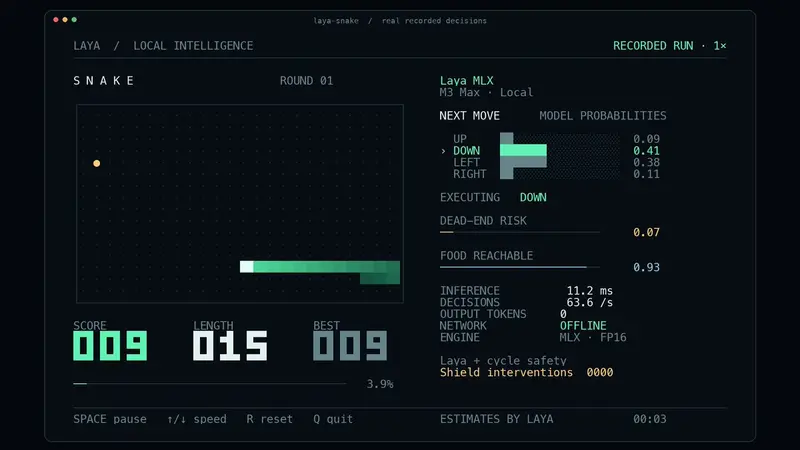
Laya-MLX
An independent MLX port of Laya for Apple Silicon, 13.4ms median for a short English decision and 7.4ms on the multilingual checkpoint, with a Snake demo that plays at up to 75 moves per second under 1GB of memory.
 mizorewwwOpenLaya-MLX on github.com
6.1k starsShort decision 13.4 ms P50Snake demo 75.4 moves/s
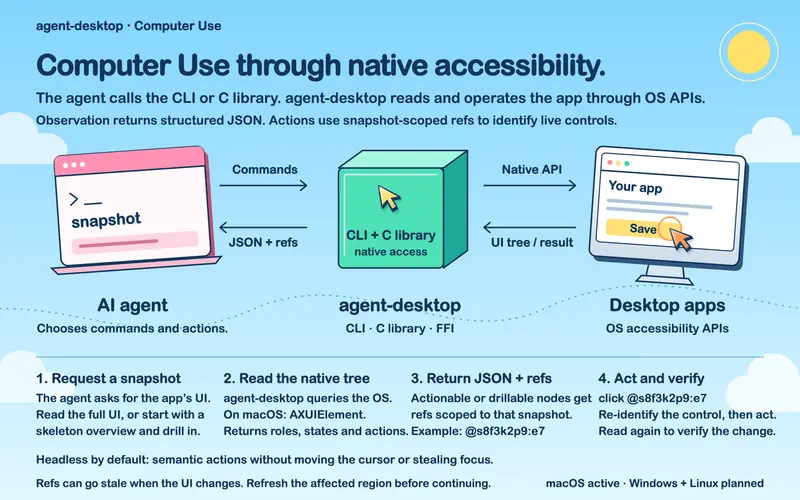
Agent Desktop
Rust desktop automation that reads apps through the OS accessibility tree instead of pixels. Its jev-desktop skill takes a plain-language goal and has Jev pick one operation and one target element per turn, so the 150-element tree never enters the agent's context.

1.6k starsToken reduction 78-96%

Laya-CoreML
Core ML ports of all three Laya checkpoints for Apple Silicon, reaching 4.98ms P50 on the Neural Engine for a short multilingual decision, with a Snake demo sustaining about 50 decisions per second.
 mizorewwwOpenLaya-CoreML on github.com
1.4k starsShort decision 4.98 ms P50Snake demo 49-50 dec/s
typesafe-computer-use
macOS computer-use loop that OCRs the screen, classifies the next action with Jev, then clicks. Author reports roughly $0.0002 per step.
 Aaron Levin (awlevin)Opentypesafe-computer-use on github.com
935 starsCost/decision $0.0002, 155xLatency 0.13-0.38s
rmalde/minecraft-agent
A Minecraft agent that pairs an Astra planner with Jev as the real-time controller, with native run recording, tested routes and run verification.

536 starsFastest run 8m 43s, -40%Decisions used 131 Jev calls
typesafe-mario
Agent that plays Super Mario Bros. by feeding structured emulator state to Jev and acting on the returned controller action.

mobile-jev
Standalone Android agent for Mobilerun where Jev makes every action decision, with a React studio UI and an Uber booking demo.
 droidrunOpenmobile-jev on github.com
377 starsUber demo ~21s, 9 actions
moritzkremb/jev-voice-browser
Streams speech word by word from the browser's Web Speech API to a Node server, which asks Jev about a dozen typed questions per partial transcript, such as intent, target element and whether the command is complete, and decides whether to act before the sentence finishes.

271 starsDecision latency ~250-350 msCost per call ~$0.0002
hr98w/jev-visual
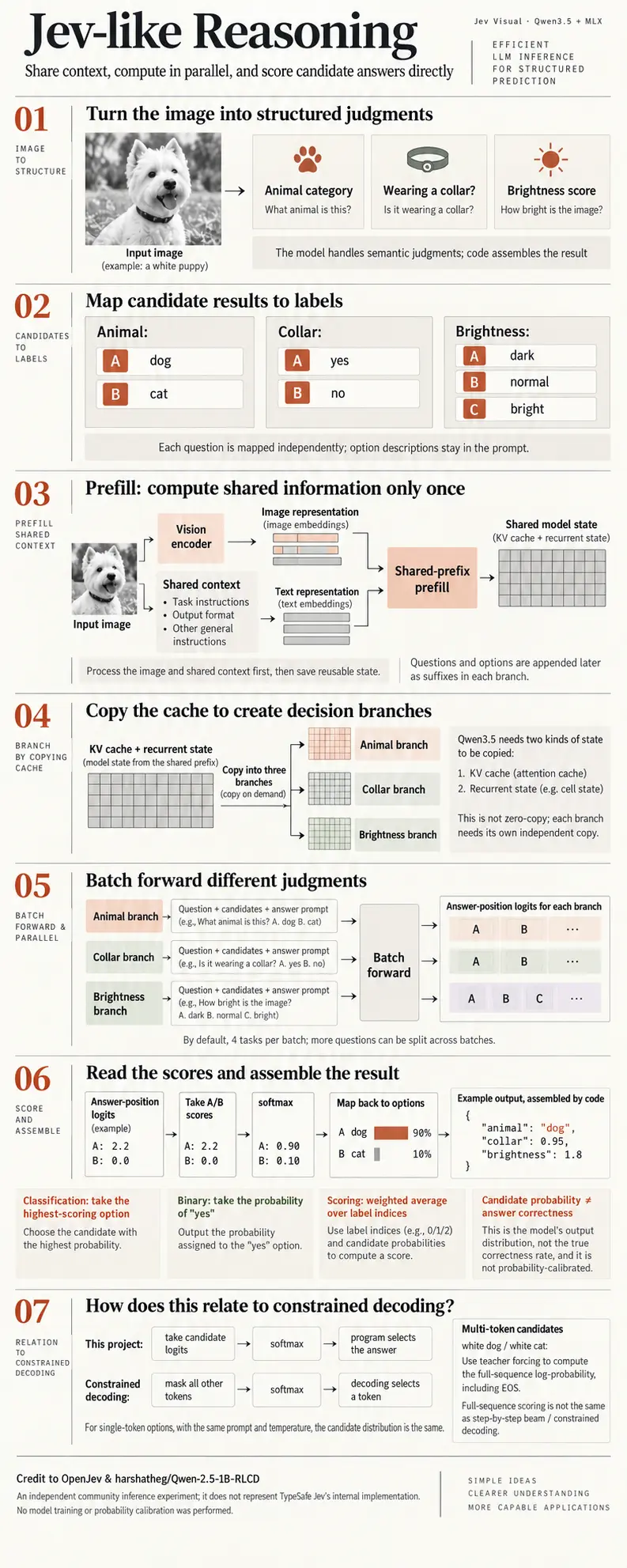
Educational Jev-like visual inference on Apple Silicon: Qwen3.5-0.8B under MLX answers several questions about one image by reusing shared multimodal context and scoring candidates from logits. Ships a browser UI, CLI, HTTP API and sorting-factory, Breakout and camera-gesture demos.

jkudish/jev-browser
Browser-use tool driving a real headless browser through an MCP server, CLI or library, with Jev choosing the actions. Returns text, markdown, HTML or accessibility-tree output plus traces and screenshots.

256 starsWikipedia nav ~4s, $0.0016
jev-drone
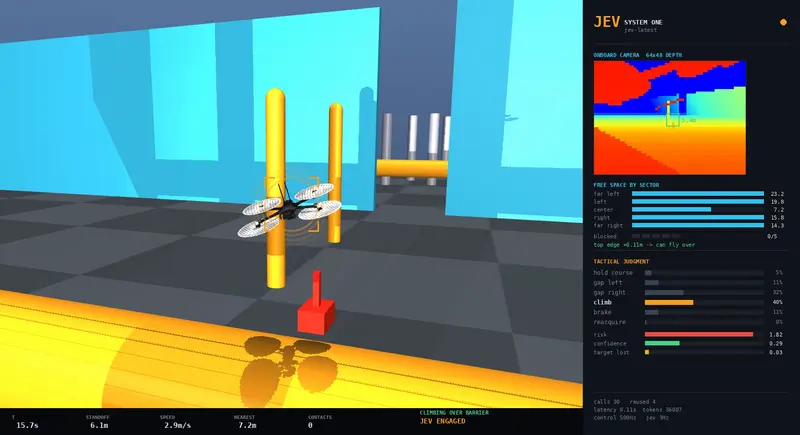
Camera-only autonomous drone simulated in MuJoCo with Jev in the control loop at 2.5 Hz.
 RomanSlackOpenjev-drone on github.com
164 starsCalls per flight ~110Decision rate ~2.5 Hz