Hermes here means Hermes Agent, the open-source agent from Nous Research. Every Hermes-plus-Jev project on this site targets it. Hermes can be extended with skills, plugins that hook into each turn, and MCP servers. People have used all three to hand small decisions to Jev. Jev picks the model for a turn, the skill to load, the passages worth reading, or whether a tool call looks safe. The main model does the writing.
What the integration does
Every project on this page gives Jev one of four jobs inside a Hermes session.
- Model routing: Before the main model runs, Jev classifies the user’s turn and picks a cheaper or stronger model. This is the intent and model routing pattern.
- Skill selection: A Hermes profile can hold hundreds of skills. Jev picks the one that fits the turn, or says none does. See agent routing and skill selection.
- Tool-call gating: A hook sends Jev each tool call before it runs. Jev answers typed questions such as “is this destructive?” and the plugin logs, allows or escalates the call. This is confidence gating: code acts only when Jev’s confidence clears a threshold.
- Memory and context: Jev decides which stored memories or retrieved passages are relevant, and which ones carry hidden instructions. See RAG passage filtering.
In each case Jev returns a typed answer, a Choice, Score or Noul, with a probability attached. It never writes text.
Official support
Nobody ships an official integration. Hermes has no Jev support built in, and TypeSafe has not released a Hermes plugin. Every project here is community-built.
Nous does run a plugin catalog inside the Hermes repo. Per the catalog README, entries join only through a pull request that a Hermes maintainer reviews and merges. You can list the catalog with hermes plugins catalog or hermes plugins search and install an entry with hermes plugins install <name>. On 2026-09-24 the catalog held more than a dozen Jev entries, Nerve among them. All of them are marked tier: community. The maintainers check security and the capabilities each plugin declares. They do not vouch for how well a plugin works.
One of the Hermes-plus-Jev examples below, a documentation hub, says Hermes has Jev built into its core and exposes eight jev_* tools in every session. The Hermes repo does not support that claim. Those tool names come from the community Nerve plugin, whose catalog entry lists tools such as nerve_decide, nerve_rank and nerve_verify. The Hermes repo also holds a 2026-09-19 evaluation of Jev for context compaction, and its verdict was not to adopt it.
Setup
First get Jev access. Most of these projects take a TYPESAFE_API_KEY. Some reach Jev through OpenRouter’s Decisions API with an OPENROUTER_API_KEY instead. See the OpenRouter integration for that route. Then pick one project.
hermes-jev-skills: model routing and skill picks
This is the broadest option. It covers model routing, skill selection, memory, search, handoffs and computer use, and it also installs into Claude Code and Codex. It needs Python 3.9 or newer and nothing else.
- Clone the repo and run the installer:
git clone https://github.com/kerpopule/hermes-jev-skills ~/hermes-jev-skills && python3 ~/hermes-jev-skills/install.py. Add--checkto see what it would change without changing anything.--uninstallreverses it. - Run
jev setup-key. It opens a one-time local page where you paste your TypeSafe key, then stores the key in the OS keychain or a restricted file. On a headless machine, usejev setup-key --tty. - Run
jev doctorto check the setup. - Optionally run
jev models suggest --writeto draft routing pools from price bands. - In Hermes, start with
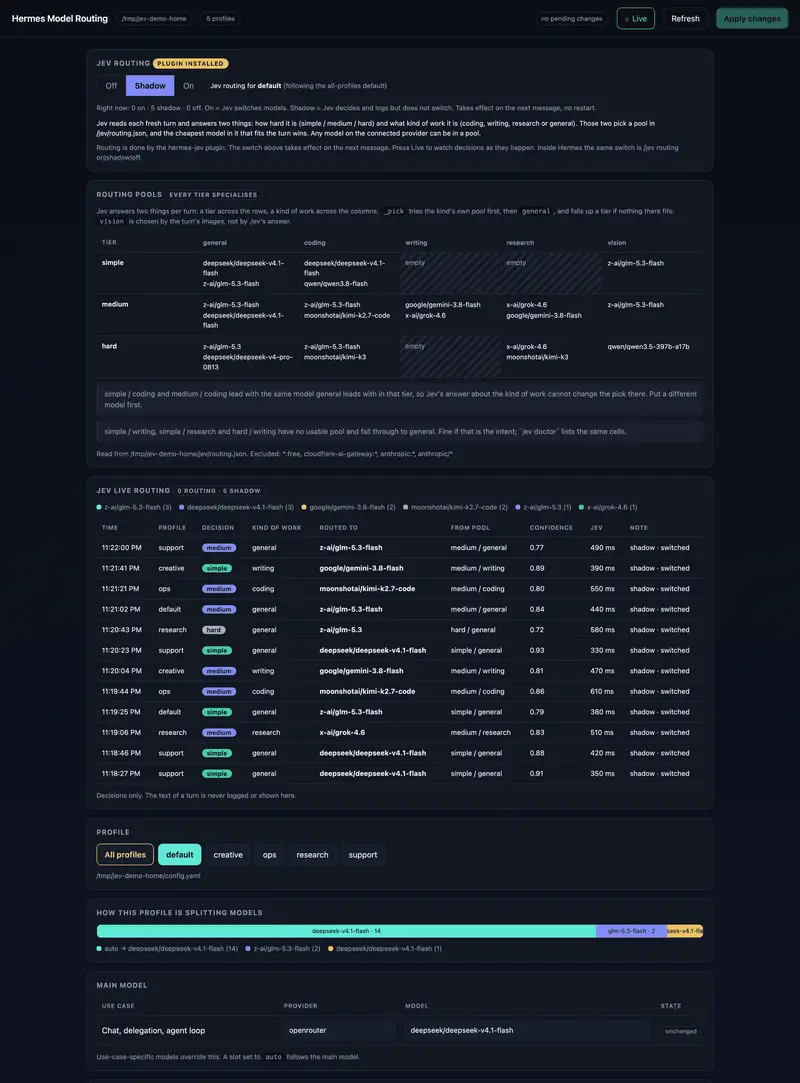
/jev routing shadow. Jev decides and logs but does not switch models. When the log looks right, use/jev routing on, and/jev skills onfor skill suggestions.
Nerve: turn supervision and tool gating
keeltrace/hermes-nerve is a Hermes plugin that runs Jev in the background. It decides whether a turn should proceed, gates tool calls, and curates what context reaches the main model. It also supervises Hermes Kanban work. The tool gate is opt-in.
- Install it from the catalog with
hermes plugins install nerve, or follow the repo’s install script. - Set
TYPESAFE_API_KEYorOPENROUTER_API_KEY. The catalog entry says that, with default settings, each turn’s user prompt (up to 12,000 characters) and redacted tool previews go to the Jev provider on every turn. - Pick a backend with
reflex_backend.jevis the default.layauses a local Laya sidecar, andshadowkeeps Jev in charge while logging Laya’s answers next to it.
ask-jev: a skill the agent calls itself
shantanugoel/ask-jev-skill is the lightest option. It adds no hooks and nothing runs automatically. The agent calls Jev as a tiebreaker when two or more next steps still look reasonable.
- Put the skill directory under your Hermes skills folder. Its
SKILL.mdexpects$HERMES_HOME/skills/autonomous-ai-agents/askjev/. - Put
TYPESAFE_API_KEYin$HERMES_HOME/.env.HERMES_HOMEdefaults to~/.hermes. - To turn it off, set
ASKJEV_DISABLED=1in the same file or delete the skill directory.
The script uses only the Python standard library. It treats Choice or Score answers at 0.6 confidence or higher as safe to act on, and it treats a Noul answer as yes at 0.7 or higher and no at 0.3 or lower. Anything between those counts as uncertain and gets escalated.
PerfectRecall: Jev-picked memory
arslanr-com/perfectrecall replaces Hermes’s Mnemosyne memory plugin. It keeps your existing SQLite database, and Jev decides which memories are relevant.
hermes plugins install https://github.com/arslanr-com/perfectrecallhermes memory setup perfectrecall- Set
OPENROUTER_API_KEYin the Hermes environment and restart Hermes.
Other catalog plugins
The catalog also lists narrower Jev plugins that are not examples on this site yet. Two of them:
- DoGMaTiiC/hermes-jev ships
jev-judge, a tool-call gate on terminal, file-write and patch calls. It logs only, in shadow mode, until you switch it to enforce. The same repo shipsjev-skill-router. - anpicasso/hermes-jev-approvals puts Jev in charge of Hermes’s smart-approval reviewer and escalates to you on any failure.
Run hermes plugins search jev for the current list.
What people built with Jev and Hermes
The examples below are real Hermes projects that use Jev. GodsBoy/jev-agent-skill-router is a standalone Python library, not a plugin. It grew out of a Hermes profile with 443 skills. andyholst/hermes-typesafe-jev is documentation only.
Limits and gotchas
Jev is a cloud API. Any hook that runs on every turn sends part of that turn to TypeSafe or OpenRouter. hermes-jev-skills documents exactly what leaves the machine for each skill and offers private_profiles to send only coarse features. Nerve’s defaults send up to 12,000 characters of prompt per turn. Read each project’s data section before you point it at private work.
Automatic hooks spend Jev credits on every turn, even if each call is cheap. Shadow modes in hermes-jev-skills, Nerve and jev-judge let you watch Jev’s decisions for a while before they change anything.
Most of these plugins fail open: if Jev is down or unsure, Hermes carries on as if the plugin were off. hermes-jev-skills says a Jev outage costs at most 2.5 seconds per routed turn. The approvals plugin fails closed and escalates to you instead. Check which behavior you are getting.
Speed and accuracy figures on this page come from the project authors and have not been checked independently. That includes hermes-jev-skills’ roughly 0.4 seconds per routing decision and GodsBoy’s 68 of 72 correct routes on a synthetic set. The compaction evaluation in the Hermes repo found Jev kept 2.1 times more context for slightly lower recall than Hermes’s shipping method. A job Jev handles well in one project is not proof it helps with every Hermes task.
None of these projects are affiliated with TypeSafe or Nous Research. Most have one maintainer and change fast. Nerve was at release 0.2.2 on 2026-09-24.
FAQ
Does Hermes support Jev officially?
No. Hermes Agent has no built-in Jev tools, and neither Nous Research nor TypeSafe ships a Jev plugin. Several community Jev plugins are listed in the Hermes plugin catalog. Nous maintainers review each entry before it is merged, but every one is marked community tier.
Which project should I start with?
For per-turn model routing and skill picks, start with hermes-jev-skills in shadow mode. For tool-call gating and background supervision, use Nerve or jev-judge. If you want the agent to ask Jev only when it is unsure, install the ask-jev skill.
Do I need a TypeSafe API key?
You need a key for Jev from TypeSafe or OpenRouter. hermes-jev-skills and ask-jev use a TYPESAFE_API_KEY. PerfectRecall defaults to OPENROUTER_API_KEY, and Nerve accepts either. Nerve can also run its decisions on a local Laya model. See how to get Jev access.
Is “Hermes” here the Nous Hermes language model?
No. The projects on this page target Hermes Agent, the agent software from Nous Research. Nous also publishes Hermes language models, which these projects leave alone. Jev sits beside whatever model Hermes Agent is running and makes small typed decisions for it.
Does this work with Claude Code or Codex too?
hermes-jev-skills installs into Claude Code and Codex as well as Hermes. Its installer looks for all three on the machine and sets up each one it finds. For tools built for those agents, see the Claude Code integration and the Codex integration.
Examples for Hermes Agent
Hermes Jev Skills
Agent skills for Hermes, Claude Code and Codex that hand Jev the routing decisions: which model tier to use, which search results to open, which memory passages to read and which hide injected instructions. Ships a dashboard with an on, shadow and off switch and publishes measured latencies per skill.

shantanugoel/ask-jev-skill
Hermes skill that lets an agent call jev-latest as a typed tiebreaker, getting Choice, Score and Noul answers with probabilities so it can act or escalate. Documents when to call Jev, confidence gates and pitfalls, and ships a live reliability suite.

keeltrace/hermes-nerve
An asynchronous Jev integration for Hermes Agent that supervises turn admission, tool-call gating and context curation in the background, using up to sixteen typed choice, score and noul questions per call.

GodsBoy/jev-agent-skill-router
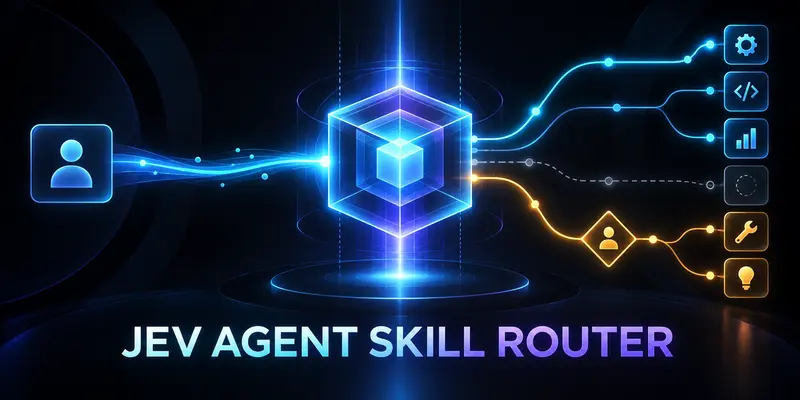
Routes agent skill selection through typed, confidence-aware Jev questions so a weak match is sent for review instead of guessed. On 72 synthetic requests it routed 68 correctly (94.4%) against 51 (70.8%) for a lexical baseline, at a median 1,287 ms; the author labels the results exploratory.

arslanr-com/perfectrecall
Agent memory where Jev decides what is worth recalling, with Mnemosyne-compatible storage and a Hermes integration.

andyholst/hermes-typesafe-jev
A documentation hub explaining how to wire Jev into Nous Research's Hermes Agent framework, with a latency and cost comparison against frontier LLMs.
