 Play the video in the post below
trungdq88/youtube-sponsor-detection on GitHub
- Stars
- 95
- Forks
- 13
- Language
- JavaScript
- Last push
- 18 Sep 2026
Post on X
- Views
- 82,221
- Likes
- 1,095
- Reposts
- 40
Read from GitHub and X on . Counts change daily.
Reported by the author
- Transcript mode
- under 1 cent/hr
under a cent
github.com - Listen mode
- ~$0.46/hr
about $0.46
github.com
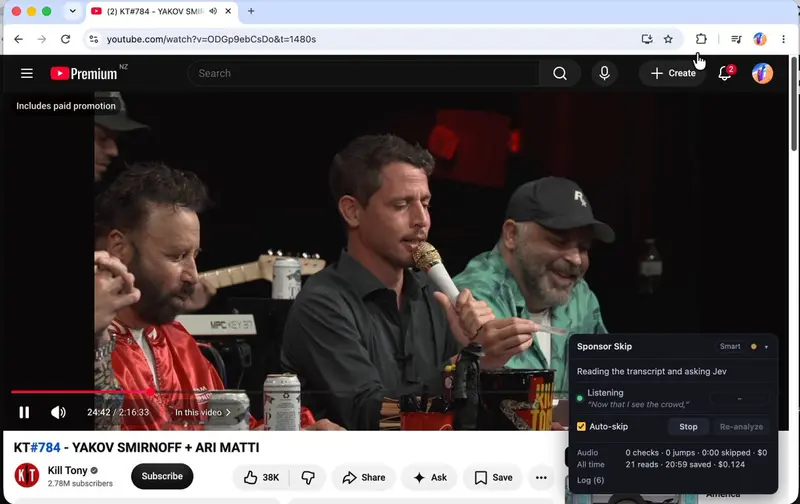
Sponsor Skip is a Chrome extension, plus a small web app for pasted links, that finds sponsor reads in a YouTube video and skips them automatically. Tony Dinh built it so that Jev only ever identifies a transcript line or answers yes or no about what it hears. Code owns every timestamp.
The tool runs in three modes with different cost and coverage tradeoffs. Transcript mode, the default, has Jev read the captions and skip the whole identified read, working only on videos where YouTube exposes a transcript, at under a cent per hour watched. Smart mode uses the transcript to find where a read starts and roughly where it ends, then listens to the audio only around that window to confirm before jumping, falling back to the transcript’s own guess if the audio hasn’t confirmed a read within 12 seconds; this needs both a TypeSafe and a Deepgram key and costs about $0.05 per hour. Listen mode skips the transcript entirely, streaming live audio to Deepgram and having Jev flag reads by ear, jumping ahead in 10-second steps until the read ends, at about $0.46 per hour.
Skips only happen above a confidence threshold, 70% by default and adjustable, and the extension is built to wait a second into a read rather than risk cutting real content early. It’s an open source, bring-your-own-key prototype.
How it uses Jev
const client = opts?.client;
if (!client) throw new Error('findSponsorSegment needs a client with systemOne()');
const model = opts.model;
const title = opts.title ?? 'unknown';
const report = opts.onProgress ?? (() => {});

if (!lines.length) {
  return { status: 'no-transcript', segments: [], windows: [], usage: { input_tokens: 0, output_tokens: 0 } };
}

const lineById = new Map(lines.map((l) => [l.id, l]));
const usage = { input_tokens: 0, output_tokens: 0 };